Recurring Reservations
A recurring reservation is a weekly pattern — the same court, at the same time, on the same day of the week, for a range of dates. It is not a separate screen or workflow; it is a mode of the ordinary reservation form that you switch on with a single checkbox.
Recurring reservation vs. season pass
Recurring reservations and season passes are two different things. A recurring reservation is a repeat-every-week booking pattern, described on this page. A season pass is a separate pricing concept — a prepaid discount that applies across a season. See Pricing & Seasons — Season Discount Configuration for how the season-pass discount works, and when a recurring series qualifies for it.
Turning On Recurring Mode
Open the reservation form as usual — drag-select on the calendar, or click Edit on an existing booking. Tick Is recurring. Two extra fields appear:
- Day of week — which weekday the series repeats on.
- Till date — the last date on which a booking should be generated.
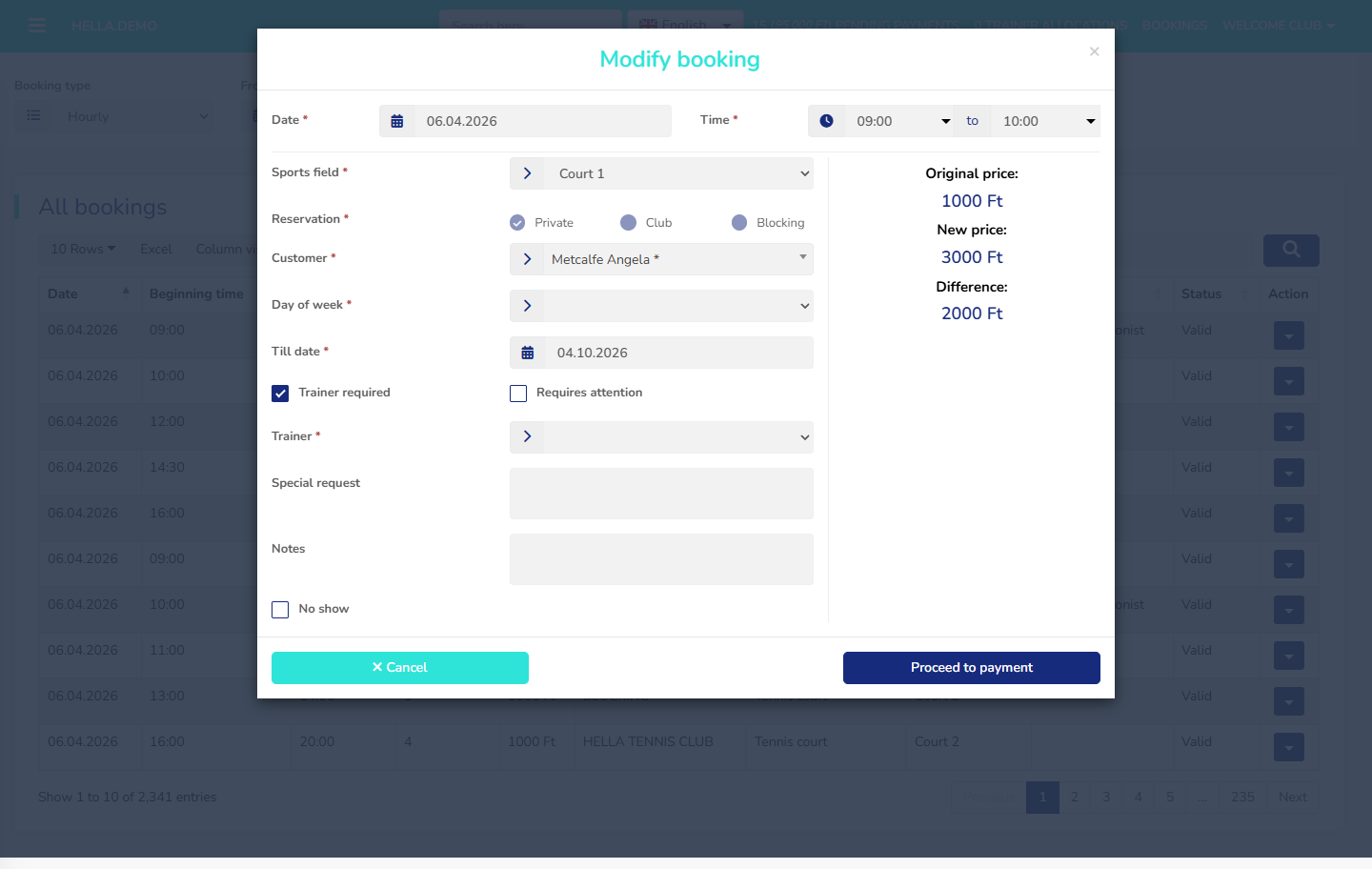 The reservation form with Is recurring turned on — Day of week and Till date appear below the checkbox.
Fill in the rest of the form as for a one-off booking (court, time, customer, any options) and save. The system generates one booking per matching weekday, from the start date through the Till date.
The day of week must match the start date
The Day of week you choose must match the actual weekday of the start date. For example, if the start date is 4 May 2026 (a Monday), Day of week must be Monday. Pick a mismatching day, and the form shows a warning before it saves.
What Gets Generated
The pattern stores the repeat rule; the system expands it into one booking per occurrence. Every generated booking links back to its pattern, so edits and cancellations can target the whole series or a single date.
flowchart LR
    RR[Recurring pattern<br/>Mon, 18:00-19:00<br/>until 30 Mar] -->|generates| R1[Booking 1<br/>Mon 6 Jan]
    RR -->|generates| R2[Booking 2<br/>Mon 13 Jan]
    RR -->|generates| R3[Booking 3<br/>Mon 20 Jan]
    RR -->|generates| RN[...]
What the Pattern Records
A recurring pattern captures the same booking details as a one-off booking, plus the recurrence rules:
- Start date and Till date — the first and last day the pattern is active.
- Day of the week — the weekday the series repeats on.
- Start and end time of each occurrence.
- Court and reservation mode (Private / Club / Blocking — see Creating and editing reservations).
- Customer (for Private and Club modes).
- Default trainer, if the series is a training slot.
- Training context — an optional link to a course or training group.
- Season — each series belongs to a single season.
- Price per occurrence — calculated from the pricing rules in force on each booking's date.
Conflicts With Existing Bookings
When generating the series, the system checks each future date against existing bookings on the same court and time. If an occurrence would collide with a booking already there, the save is blocked with an overlap error — adjust the court, the time, or the date range and try again.
Editing a Series
When you edit a booking that belongs to a series, the form opens the same way as for a one-off. The price-change panel on the right shows how many occurrences the edit will touch — To be modified, To be created, To be deleted — so you can see the impact before you save.
Past occurrences are left alone; only future occurrences are affected.
Cancelling a Series
A recurring series can be cancelled or deleted at two levels:
- The whole series. Cancels every future occurrence that has not already passed. Past occurrences are left as they were.
- A single occurrence. Leaves the rest of the series intact; only the one booking is cancelled.
Each generated booking follows the normal reservation status lifecycle — a cancelled-in-time booking and a cancelled-after-the-deadline booking are recorded differently. The customer's cancellation deadline still applies to each occurrence individually. Cancellation fees, where the club charges them, are calculated per occurrence.
Demo Behaviour
From the demo system
A weekday slot used by a single customer every Monday from January to June — the admin creates one recurring pattern, picks Monday as the day of week, and the system generates about twenty-five weekly bookings automatically. Your system may be configured differently.